Wikipedia, made for reading
Read deeply.
Wander freely.
WikiReader is a quiet, beautiful way to read Wikipedia on your phone. Follow any link without losing your place, and keep every rabbit hole as a trail you can come back to.
Free on iPhone, iPad and Android
Octopus → Ink → Tyrian purple → Byzantine Empire → Byzantine shipbuilding
You look up one thing. Two hours later, you know exactly how you got here.
The reader
A page made for long reading.
Articles are set in Literata, a typeface designed for reading on screens. Choose Paper, Night or Black, pick your text size and spacing, and let the page get out of the way.
- Footnotes and citations open in place
- Contents for every article
- Every Wikipedia language edition
Link previews
Peek before you leap.
Tap a link and get a preview first. Read a few lines, save it for later, or follow it. Either way, you never lose your place in the article you were reading.
Reading trails
Every rabbit hole becomes a trail.
Each article remembers where you came from. Your wanderings turn into journeys with branches, so you can always find your way back.
Share a trail as a link, and a friend can follow your exact path, in the app or right in their browser. No app needed.
Focus
Read one word at a time.
Focus uses RSVP, short for rapid serial visual presentation. Normally your eyes jump across every line. In Focus they stay still, and the words come to you at 300, 500 or 700 words a minute.
You never lose the article. The section stays at the top, the article's images sit behind the words, and when a link flies by, one tap saves it to your trail.
Reading stats
Stats that feel good, without the guilt.
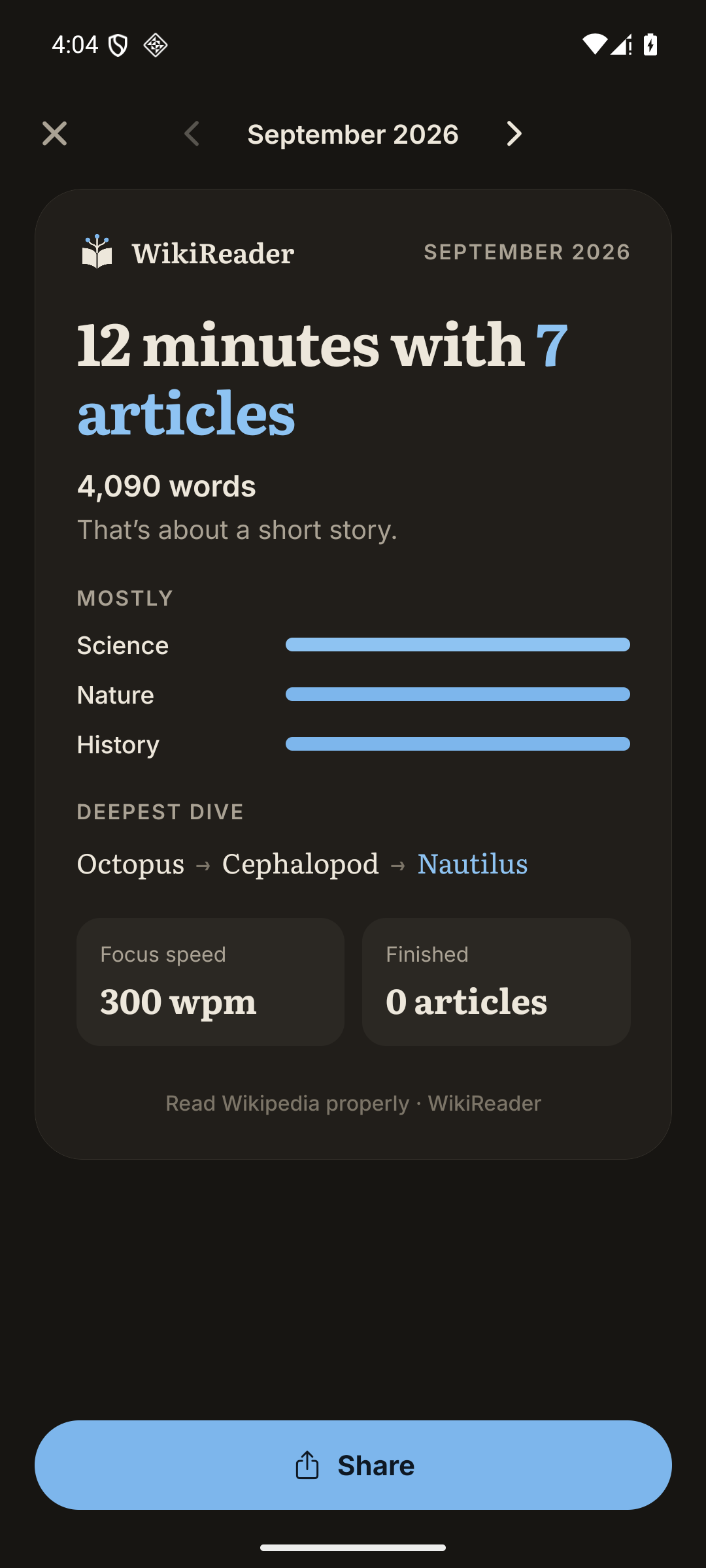
See your reading rhythm, where your curiosity went, the articles you keep circling, and your Focus speed. Every month you get a recap worth sharing.
No streaks. No guilt trips. Just a clear picture of what you've been reading.
Picked for you
Recommendations that tell you why.
Optional picks based on what you've read, each with the reason it was chosen. Accounts and sync are optional too, and one switch turns recommendations off.
And everything else a reader wants.
Foldables and tablets
At home on every screen.
WikiReader was built and tested on a Samsung Galaxy Z Fold. Unfold it and the layout opens up to fill the bigger screen. Fold it, and your article is waiting on the cover screen. It works on iPad too.
The article comes first
The full Wikipedia article and its citations, not a summary of them.
Your context, kept
Scroll position, branches and trails are saved as you read.
You stay in control
Transparent picks, optional accounts, and no engagement traps.

Start your next rabbit hole.
Free on iPhone, iPad and Android.